Appearance
Visual Builder Overview
The Visual Builder is where you design what your agent says and does. Instead of writing one long prompt and hoping, you build the conversation as a workflow of connected nodes that you can read, reorder and test.
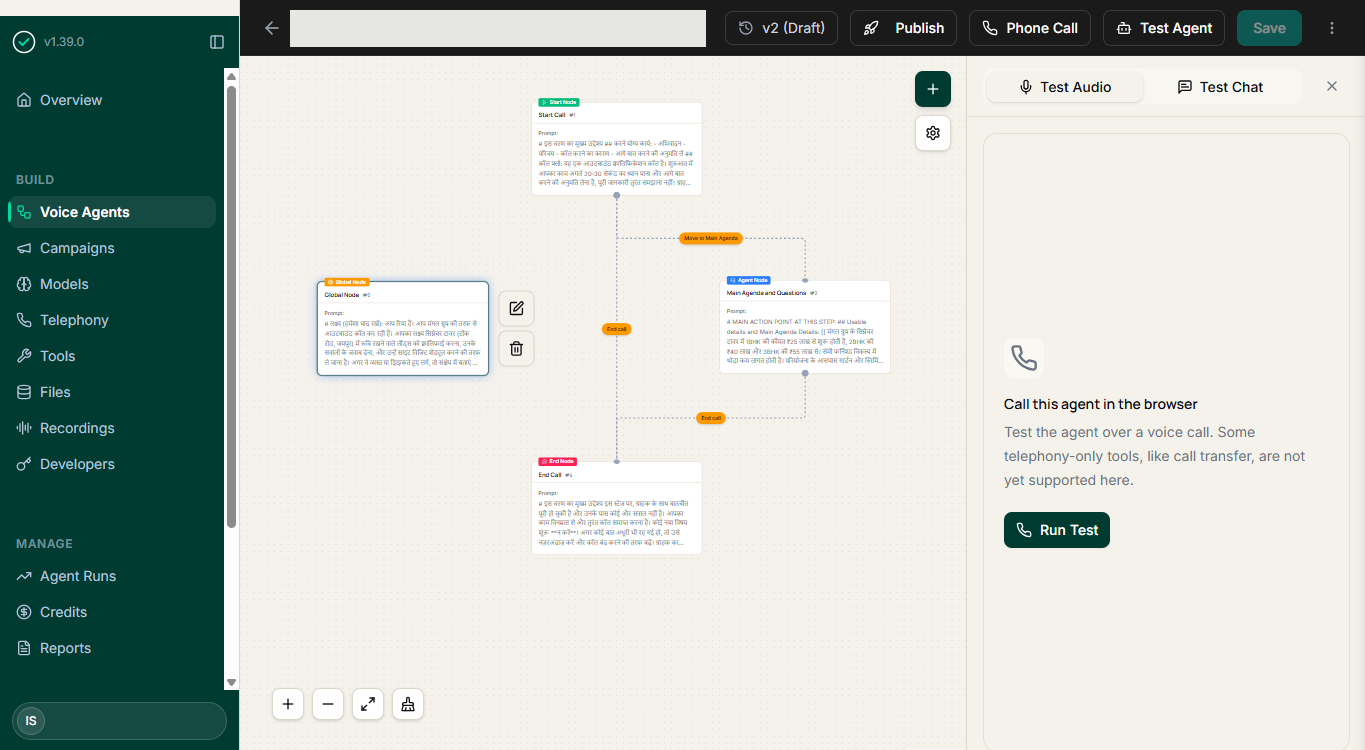 Tap or click the screenshot to open it full size — the canvas has a lot of detail that's easier to read at full resolution, especially on a phone.
Why a workflow instead of one prompt
A single large prompt is hard to review, risky to change, and difficult to explain to the people who own the conversation. A workflow fixes all three:
- Reviewable — someone who does not write prompts can read the flow and tell you the third question is wrong.
- Changeable — you edit one node without disturbing the rest of the call.
- Testable — you can see which step a call went through when something goes wrong.
The building blocks
Each of these is its own guide:
- Business Context — what the agent knows, written once
- Start Call — how a conversation opens
- Conversation Nodes — the steps of the call
- End Call — how the call closes and what happens next
- Connections & Routing — how the agent takes different paths
- Extraction Variables — the structured data you get back
- Guardrails — the limits that apply across the whole call
- Human Handoff — when and how a call moves to a person
Test as you build
The builder is only half the loop. After each meaningful change, talk to the agent in your browser and listen to what actually happens.
A working order
- Fill in business context first — everything else leans on it.
- Add guardrails early, so you are never testing an unconstrained agent.
- Build one straight path through the conversation, open to close.
- Browser test it.
- Add branches for the real answers you heard.
- Define extraction variables for the fields you need.
- Set the handoff rule and test that it fires.