Appearance
Browser Test
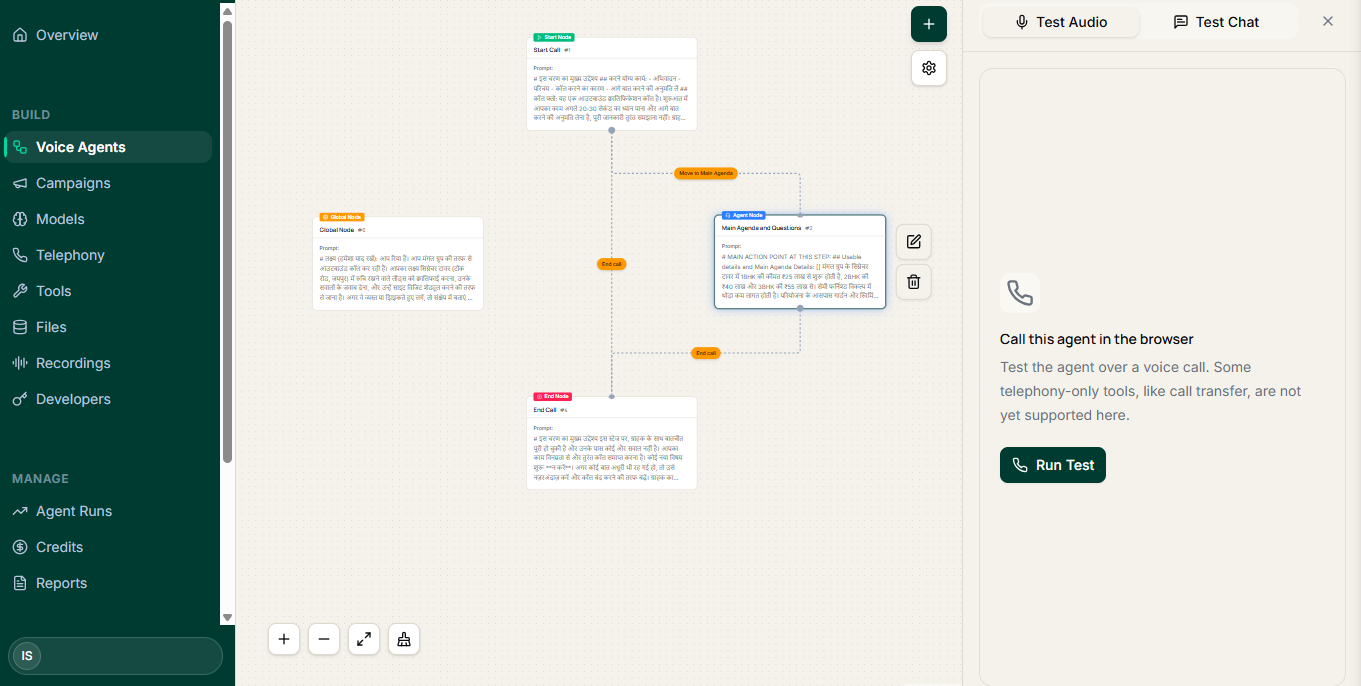
A browser test is a real conversation with your agent, held in your browser over WebRTC. No phone number is involved, so you can hear exactly how the agent behaves before a customer ever does.
This is the most useful habit in the whole product. Build a little, test, fix, test again.
Before you test
- The agent exists and has a workflow — see Create Your First Voice Agent.
- You are on a device with a working microphone.
- You are somewhere you can speak out loud and hear the reply. Headphones help; they also stop the agent hearing its own voice.
Microphone permissions
The browser will ask for microphone access the first time you start a test. The conversation cannot run without it.
If you are not prompted, or the agent never hears you:
- Check the browser's site permissions and allow the microphone for the CallMangal app.
- Check the operating system's microphone privacy settings — a browser-level "allow" does not help if the OS is blocking the browser.
- Make sure the right input device is selected, especially with a headset connected.
- Close other applications that may be holding the microphone exclusively.
- Reload the page after changing any permission.
Insecure contexts
Browsers only grant microphone access over HTTPS (or on localhost). If the page is not secure, the prompt will not appear at all.
Running the test
Start the test from the agent, allow the microphone, and talk to it the way a customer would.
Two rules make the test worth doing:
- Do not read a script. You already know what the agent expects. Your customers do not.
- Try to break it. Answer a different question than the one asked. Interrupt. Go quiet. Give an answer with two facts in it. Ask for a person.
What to listen for
| Listen for | What it usually means |
|---|---|
| Awkward or long-winded greeting | The opening node is doing too much |
| It asks something you already answered | A branch is missing, or the field is not being captured |
| It talks over you | The turn is ending too early |
| Long pause before replying | Worth noting; raise it with support if it persists |
| It invents a fact | Business context is thin, or a guardrail is missing |
| It promises something it should not | A guardrail is missing |
| It will not hand over when asked | Handoff condition is not configured or not matching |
| Captured data is empty or wrong | Extraction variables need naming or the question needs rewording |
Read the transcript afterwards
Do not judge only on memory. The transcript shows what the agent heard, which is often different from what you said — especially with names, numbers and mixed Hindi–English speech.
If the transcript shows the wrong word, the problem is upstream of the workflow: rephrase the question so the answer is easier to recognise, or ask for the value in a more constrained way.
Test the guardrails on purpose
Guardrails only count if they fire. In a browser test, deliberately:
- ask for a discount or a commitment the agent must not make,
- raise a topic it should decline,
- ask to speak to a human.
If nothing happens, the guardrail is not doing its job yet.
Test multilingual behaviour honestly
If your customers switch between Hindi and English mid-sentence, test that — not a clean monolingual conversation. Code-switching is where voice agents most often fall down, and it is the realistic case for most Indian phone calls.
When to stop testing and make a real call
Move on when:
- a straight, cooperative conversation completes cleanly,
- at least one awkward conversation ends sensibly,
- the fields you care about come back populated and correct,
- the handoff rule fires when you ask for a person,
- nothing the agent says would embarrass you in front of a customer.
Then, and only then, connect a phone number. Confirm the account has credits first.